What is a Data Lake and When Should You Build One?
A practical guide to understanding data lakes — what they are, how they differ from data warehouses, and when your business actually needs one.
If you've been hearing the term "data lake" thrown around and wondering what it actually means for your business — this guide is for you. We'll cut through the jargon and give you a clear, practical understanding of what a data lake is, when you need one, and how to get started.
What is a Data Lake?
A data lake is a centralized storage repository that holds a large amount of raw data in its native format — structured, semi-structured, and unstructured — until it's needed for analysis.
Think of it this way: a data warehouse is like a bottled water factory — water comes in, gets filtered, processed, and stored in a specific format. A data lake is like an actual lake — all kinds of water flow in from different sources and sit there until someone decides to use it.
Data that lives in a data lake includes:
- Database records (structured)
- JSON/XML files from APIs (semi-structured)
- Log files, PDFs, images, videos (unstructured)
- Clickstream data, IoT sensor readings
- Social media feeds
Data Lake vs Data Warehouse
This is the most common question we get. Here's a simple comparison:
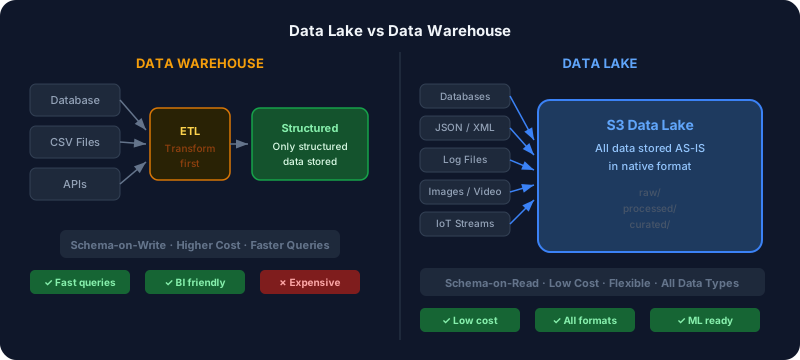
| | Data Lake | Data Warehouse | |---|---|---| | Data format | Raw, any format | Processed, structured | | Schema | Schema-on-read | Schema-on-write | | Cost | Low (object storage) | Higher (compute-heavy) | | Users | Data scientists, engineers | Business analysts | | Speed to store | Fast | Slower (ETL needed first) | | Query speed | Slower | Faster |
The key difference: In a data warehouse, you define the structure before storing data. In a data lake, you store first and define structure when you query.
When Should You Build a Data Lake?
Not every business needs a data lake. Here's how to know if you do:
You need a data lake if:
- You have data coming from many different sources (databases, APIs, files, IoT devices)
- Your data scientists need access to raw data for machine learning and advanced analytics
- You want to store data cheaply before you know exactly how you'll use it
- You're dealing with large volumes — tens of gigabytes or more per day
- You need a single source of truth across your organization
You don't need a data lake if:
- Your data is small and fits in a single database
- You only need simple reports and dashboards
- Your team doesn't have data engineering resources
- All your data is already structured and clean
What Does a Data Lake Look Like on AWS?
AWS S3 (Simple Storage Service) is the foundation of most modern data lakes. Here's a typical architecture:
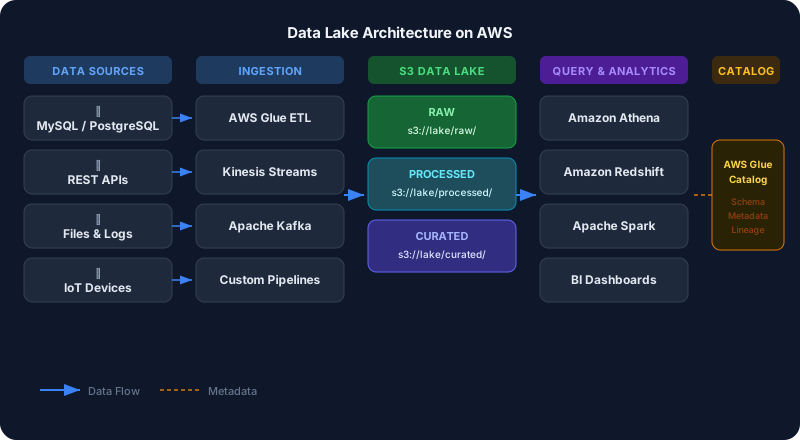
Ingestion Layer Data flows in from multiple sources — your production databases, third-party APIs, application logs, and event streams. Tools like AWS Glue, Kinesis, or custom pipelines handle this.
Storage Layer Raw data lands in S3, organized in a logical folder structure:
s3://your-data-lake/
  raw/           ← original data as-is
  processed/     ← cleaned and transformed data
  curated/       ← ready for analytics
Cataloging Layer AWS Glue Data Catalog or Apache Hive Metastore keeps track of what data exists, its schema, and where it lives. Without this, your data lake becomes a data swamp.
Query Layer Tools like Amazon Athena let you query data directly in S3 using SQL — no need to load it into a database first. You pay only for the data you query.
Access Control Layer AWS Lake Formation manages permissions — who can see what data, at the table, column, or row level.
Common Data Lake Mistakes to Avoid
1. Building a data swamp A data swamp is a data lake without proper governance — data flows in but nobody knows what's in there, where it came from, or whether it's reliable. Always implement a data catalog from day one.
2. No partitioning strategy Storing all your data in flat folders makes queries slow and expensive. Partition your data by date, region, or whatever dimensions you query most. This can make queries 10-100x cheaper.
3. Ignoring data quality Raw data is messy. Build data quality checks into your ingestion pipelines so bad data doesn't pollute your lake.
4. No access governance Not all data should be accessible to everyone. Set up proper IAM roles and Lake Formation permissions from the start.
How Long Does it Take to Build a Data Lake?
- Basic setup (S3 + Glue + Athena): 1-2 weeks
- With data pipelines: 1-2 months depending on number of sources
- Enterprise-grade with governance: 3-6 months
The good news is that cloud providers have made data lakes significantly easier to build than they were 5 years ago. You don't need a team of 10 engineers anymore.
Getting Started
If you're considering a data lake, here's a simple starting point:
- Audit your data sources — list every system that produces data you care about
- Estimate your data volume — how much data per day, per month?
- Define your use cases — what questions do you want to answer with this data?
- Start small — pick one data source, land it in S3, query it with Athena
- Expand gradually — add more sources as you prove value
A data lake doesn't have to be a massive multi-year project. You can start small with a single data source and expand as your needs grow.
Ready to build your data lake? At DataStackFlow, we help businesses design and implement data lake architectures on AWS — from the initial setup to full production deployments. Get in touch to discuss your specific needs.
Need help with your data infrastructure?
DataStackFlow helps businesses build scalable data lakes, pipelines, and migrations on AWS. Let's talk.
Get in Touch →