How to Migrate Data from MySQL to AWS S3 (Step-by-Step Guide)
A practical, step-by-step guide to migrating your MySQL data to AWS S3 — covering extraction, transformation, storage formats, and common pitfalls.
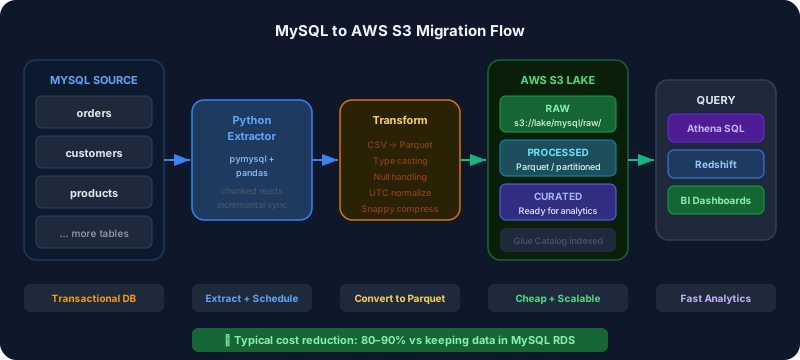
Migrating data from MySQL to AWS S3 is one of the most common data engineering tasks — whether you're building a data lake, archiving historical data, or setting up analytics on top of S3. This guide walks you through the entire process with practical examples.
Why Move MySQL Data to S3?
MySQL is excellent for transactional workloads but has limitations for analytics:
- Cost at scale: Keeping years of historical data in MySQL is expensive
- Query performance: Analytical queries (full table scans, aggregations) are slow on MySQL
- No separation of storage and compute: You can't scale read replicas for analytics without paying for more database instances
- Not built for large-scale analytics: Tools like Athena, Spark, and Redshift Spectrum work natively with S3
By landing your MySQL data in S3, you unlock cheap storage, powerful analytics tools, and the ability to build a full data lake.
What You'll Need
- AWS account with S3 and appropriate IAM permissions
- MySQL database (5.7 or higher)
- Python 3.8+ (for the extraction scripts)
- AWS CLI configured locally
Step 1: Design Your S3 Folder Structure
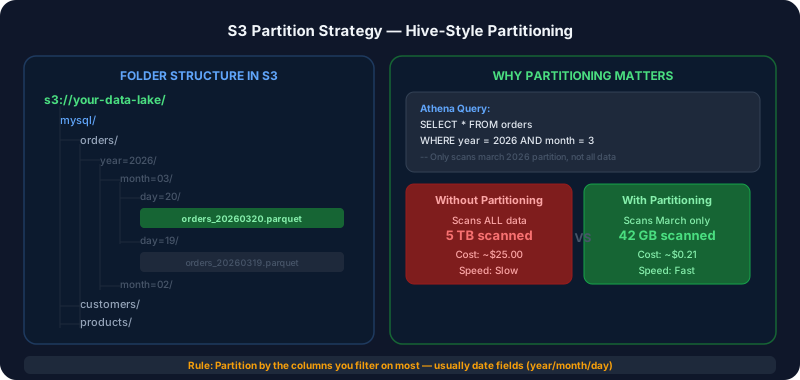
Before writing any code, plan how you'll organize data in S3. A well-organized structure makes queries faster and cheaper.
Recommended structure:
s3://your-data-lake/
  mysql/
    orders/
      year=2026/
        month=03/
          day=20/
            orders_20260320.parquet
    customers/
      year=2026/
        month=03/
          customers_20260320.parquet
    products/
      ...
This partitioned structure means Athena only scans the data you need — if you query March orders, it doesn't touch January or February data.
Step 2: Choose Your File Format
Don't store data in S3 as CSV. Use Parquet.
| Format | Storage | Query Speed | Compression | |---|---|---|---| | CSV | Baseline | Slow | None | | JSON | 20% larger | Slow | None | | Parquet | 75% smaller | 10-100x faster | Excellent |
Parquet is a columnar format that Athena, Spark, and Redshift all love. Queries that touch 2 columns don't read the other 50 — massive cost savings.
Step 3: Set Up IAM Permissions
Create an IAM user or role with minimal permissions for the migration:
{
  "Version": "2012-10-17",
  "Statement": [
    {
      "Effect": "Allow",
      "Action": [
        "s3:PutObject",
        "s3:GetObject",
        "s3:ListBucket"
      ],
      "Resource": [
        "arn:aws:s3:::your-data-lake",
        "arn:aws:s3:::your-data-lake/*"
      ]
    }
  ]
}
Never use your root AWS account or admin credentials for automated scripts.
Step 4: Write the Extraction Script
Here's a Python script that extracts a MySQL table and writes it to S3 as Parquet:
import boto3
import pandas as pd
import pymysql
from datetime import datetime, date

# Configuration
MYSQL_CONFIG = {
    'host': 'your-mysql-host',
    'user': 'your-user',
    'password': 'your-password',
    'database': 'your-database',
    'port': 3306
}

S3_BUCKET = 'your-data-lake'
S3_PREFIX = 'mysql'

def extract_table(table_name: str, date_column: str = None):
    """Extract a MySQL table and upload to S3 as Parquet."""

    today = date.today()

    # Connect and extract
    connection = pymysql.connect(**MYSQL_CONFIG)

    if date_column:
        # Incremental: only yesterday's data
        query = f"""
            SELECT * FROM {table_name}
            WHERE DATE({date_column}) = DATE_SUB(CURDATE(), INTERVAL 1 DAY)
        """
    else:
        query = f"SELECT * FROM {table_name}"

    df = pd.read_sql(query, connection)
    connection.close()

    print(f"Extracted {len(df)} rows from {table_name}")

    if df.empty:
        print(f"No data to upload for {table_name}")
        return

    # Build S3 path with partitioning
    s3_key = (
        f"{S3_PREFIX}/{table_name}/"
        f"year={today.year}/"
        f"month={today.month:02d}/"
        f"day={today.day:02d}/"
        f"{table_name}_{today.strftime('%Y%m%d')}.parquet"
    )

    # Write to Parquet in memory and upload
    parquet_buffer = df.to_parquet(index=False, compression='snappy')

    s3 = boto3.client('s3')
    s3.put_object(
        Bucket=S3_BUCKET,
        Key=s3_key,
        Body=parquet_buffer
    )

    print(f"Uploaded to s3://{S3_BUCKET}/{s3_key}")

# Run for each table
extract_table('orders', date_column='created_at')
extract_table('customers', date_column='updated_at')
extract_table('products')
Step 5: Handle Large Tables
For tables with millions of rows, don't load everything into memory. Use chunked reading:
def extract_large_table(table_name: str, chunk_size: int = 100_000):
    """Extract large tables in chunks to avoid memory issues."""

    connection = pymysql.connect(**MYSQL_CONFIG)

    # Get total count
    cursor = connection.cursor()
    cursor.execute(f"SELECT COUNT(*) FROM {table_name}")
    total_rows = cursor.fetchone()[0]

    print(f"Total rows: {total_rows:,}")

    # Process in chunks
    offset = 0
    chunk_num = 0

    while offset < total_rows:
        query = f"SELECT * FROM {table_name} LIMIT {chunk_size} OFFSET {offset}"
        df_chunk = pd.read_sql(query, connection)

        # Upload each chunk as separate file
        s3_key = f"{S3_PREFIX}/{table_name}/full_load/chunk_{chunk_num:04d}.parquet"
        s3.put_object(
            Bucket=S3_BUCKET,
            Key=s3_key,
            Body=df_chunk.to_parquet(index=False)
        )

        offset += chunk_size
        chunk_num += 1
        print(f"Processed {min(offset, total_rows):,} / {total_rows:,} rows")

    connection.close()
Step 6: Set Up Incremental Sync
A one-time migration isn't enough — you need ongoing sync. There are two approaches:
Timestamp-based incremental (simple):
Track the last run time and only extract records updated since then. Works when your tables have a reliable updated_at column.
Change Data Capture (advanced): Use tools like AWS DMS, Debezium, or MySQL binlog replication to capture every insert, update, and delete in realtime. More complex but complete — no missed records.
For most use cases, timestamp-based incremental is sufficient and much simpler to implement.
Step 7: Register in AWS Glue Data Catalog
Once data is in S3, register it in Glue so Athena can query it:
aws glue create-database --database-input '{"Name": "mysql_data"}'

aws glue create-crawler \
  --name mysql-orders-crawler \
  --role AWSGlueServiceRole \
  --database-name mysql_data \
  --targets '{"S3Targets": [{"Path": "s3://your-data-lake/mysql/orders/"}]}'

aws glue start-crawler --name mysql-orders-crawler
After the crawler runs, you can query directly with Athena:
SELECT
    year,
    month,
    COUNT(*) as order_count,
    SUM(total_amount) as revenue
FROM mysql_data.orders
WHERE year = 2026 AND month = 3
GROUP BY year, month
Common Pitfalls
Data type mismatches: MySQL's DECIMAL doesn't always map cleanly to Parquet types. Always validate your data after migration.
NULL handling: MySQL and Parquet handle NULLs differently. Test edge cases in your data.
Timezone issues: MySQL stores timestamps in the server timezone. Make sure you're normalizing to UTC before storing in S3.
Not testing incremental logic: Test what happens if your pipeline runs twice for the same day. You should either overwrite or skip — not duplicate.
Forgetting indexes: MySQL queries in your extraction scripts can be slow without proper indexes on your date columns. Add EXPLAIN to check query plans.
Cost Estimate
For a typical migration of 100GB of MySQL data:
- S3 storage: ~$2/month (Parquet compression reduces 100GB to ~25GB)
- Athena queries: $0.25 per TB scanned (negligible for small datasets)
- Data transfer out of MySQL: free if same region, ~$0.09/GB cross-region
The cost savings vs keeping data in MySQL RDS are typically 80-90%.
Migrating data from MySQL to AWS S3 is a foundational step for building a modern data stack. Done right, it unlocks powerful analytics at a fraction of the cost. If you'd like help designing or implementing your migration, reach out to DataStackFlow — we've done this dozens of times across different industries and scales.
Need help with your data infrastructure?
DataStackFlow helps businesses build scalable data lakes, pipelines, and migrations on AWS. Let's talk.
Get in Touch →