Data Pipeline Best Practices for 2026
10 battle-tested best practices for building reliable, scalable, and maintainable data pipelines — from idempotency to observability.
Building a data pipeline that works in development is easy. Building one that runs reliably in production, at scale, for years without constant firefighting — that's the hard part. After building pipelines across dozens of organizations, here are the practices that separate good data engineering from great data engineering.
1. Make Every Pipeline Idempotent
Idempotency means running your pipeline multiple times produces the same result as running it once. This is the single most important property of a reliable pipeline.
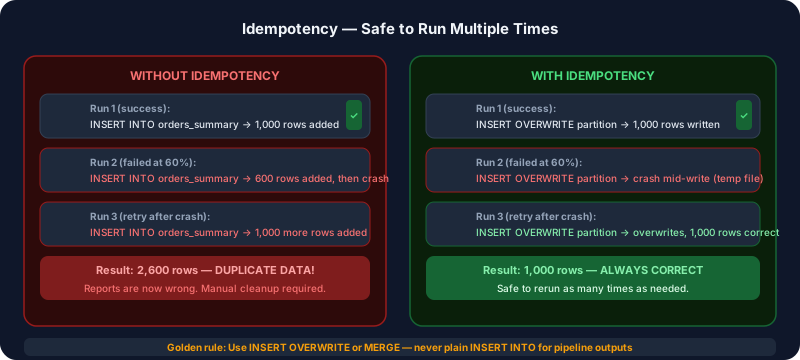
Without idempotency: if your pipeline fails halfway through and reruns, you get duplicate data. With idempotency: reruns are safe.
How to implement it:
- Use
INSERT OVERWRITEinstead ofINSERT INTO - Write to a staging location first, then atomically swap
- Use
MERGEstatements that upsert instead of insert - Partition your output by date and overwrite the full partition on reruns
-- Bad: creates duplicates on rerun
INSERT INTO orders_summary SELECT ... FROM orders WHERE date = '2026-03-20'

-- Good: safe to rerun
INSERT OVERWRITE TABLE orders_summary
PARTITION (date = '2026-03-20')
SELECT ... FROM orders WHERE date = '2026-03-20'
2. Always Implement Retry Logic
Networks fail. APIs go down. Databases have transient errors. Your pipeline should handle this gracefully — not alert your on-call engineer at 3 AM because of a 30-second database blip.
Implement exponential backoff:
import time
from functools import wraps

def retry(max_attempts=3, backoff_base=2):
    def decorator(func):
        @wraps(func)
        def wrapper(*args, **kwargs):
            for attempt in range(max_attempts):
                try:
                    return func(*args, **kwargs)
                except Exception as e:
                    if attempt == max_attempts - 1:
                        raise
                    wait = backoff_base ** attempt
                    print(f"Attempt {attempt + 1} failed. Retrying in {wait}s...")
                    time.sleep(wait)
        return wrapper
    return decorator

@retry(max_attempts=3)
def fetch_from_api(url):
    return requests.get(url, timeout=30)
3. Validate Data at Every Stage
Don't assume data coming in is clean. Validate at ingestion, after transformation, and before loading.
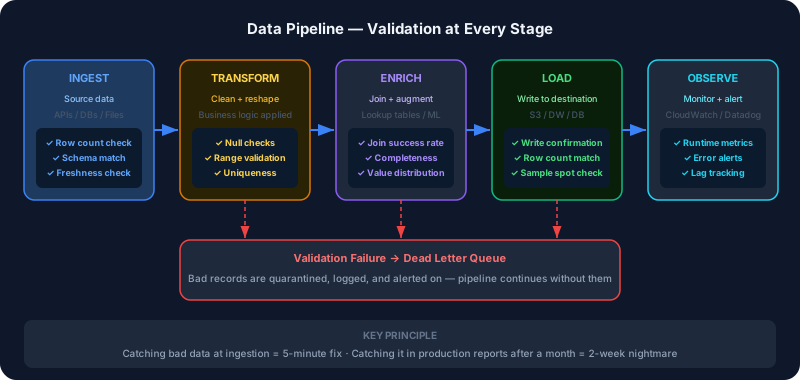 Catching a bad data issue at ingestion is a 5-minute fix. Catching it after it's been sitting in your data warehouse for a month is a 2-week nightmare.
Checks to implement:
- Row count: is the output roughly what you expect? (sudden 90% drop = problem)
- Null checks: are critical columns nullable that shouldn't be?
- Range checks: are dates in valid ranges? Are prices positive?
- Uniqueness: are primary keys actually unique?
- Freshness: is the data actually recent?
def validate_output(df, table_name, expected_min_rows=100):
    assert len(df) >= expected_min_rows, f"{table_name}: too few rows ({len(df)})"
    assert df['order_id'].nunique() == len(df), f"{table_name}: duplicate order_ids"
    assert df['amount'].min() >= 0, f"{table_name}: negative amounts found"
    assert df['created_at'].max() > pd.Timestamp.now() - pd.Timedelta('2 days'), \
        f"{table_name}: data is stale"
    print(f"{table_name}: all validations passed ({len(df):,} rows)")
4. Build Observability In From Day One
You can't fix what you can't see. Every pipeline should emit metrics you can monitor.
What to track:
- Runtime: how long does each step take? Are runs getting slower?
- Row counts: how many records processed at each stage?
- Error rates: what percentage of records fail processing?
- Data freshness: when was data last successfully updated?
- Lag: how far behind is realtime processing?
Use AWS CloudWatch, Datadog, or even a simple metrics table in your database. The tool matters less than the discipline of measuring.
5. Separate Configuration from Code
Hard-coding connection strings, table names, and schedule times in your pipeline code is a maintenance nightmare. Someone will forget to update a value when deploying to production.
# Bad
connection = psycopg2.connect("host=prod-db user=admin password=secret123")

# Good — read from environment variables
import os
connection = psycopg2.connect(
    host=os.environ['DB_HOST'],
    user=os.environ['DB_USER'],
    password=os.environ['DB_PASSWORD']
)
Store secrets in AWS Secrets Manager or SSM Parameter Store, not in code or config files.
6. Log Everything, But Thoughtfully
Good logging makes debugging 10x faster. Bad logging creates noise that makes it impossible to find the signal.
Log at the right level:
DEBUG: detailed step-by-step information (only in development)INFO: high-level progress ("Extracted 50,000 rows from orders")WARNING: something unexpected but recoverable ("No data found for 2026-03-20, skipping")ERROR: something failed and needs attention
Always include context in your logs: which table, which date partition, how many rows, how long it took.
import logging
logger = logging.getLogger(__name__)

logger.info(f"Starting extraction: table={table_name}, date={run_date}, mode=incremental")
logger.info(f"Extracted {row_count:,} rows in {elapsed:.1f}s")
logger.warning(f"No data found for {run_date} in {table_name} — this may be expected")
logger.error(f"Failed to connect to {table_name} after 3 attempts: {str(e)}")
7. Design for Backfills
At some point, you will need to reprocess historical data. A schema changed. A bug introduced bad data. A new column was added. If your pipeline isn't designed for backfills, this becomes a manual, error-prone process.
Design for backfills from the start:
- Accept a
run_dateparameter, not just "today" - Make the pipeline idempotent (see #1)
- Document how to run a backfill in your README
- Test backfills work before you need them in production
# Accept run_date parameter for backfills
def run_pipeline(run_date: date = None):
    if run_date is None:
        run_date = date.today() - timedelta(days=1)
    # rest of pipeline...
8. Use Incremental Loading, Not Full Loads
Full loads — reading your entire source table every run — don't scale. A pipeline that processes 1GB of orders data in 10 minutes will process 1TB in 10 hours once your business grows.
Design incremental loads from the beginning:
- Track a watermark (the maximum
updated_attimestamp from the last run) - Only extract records created or modified since the watermark
- Store the watermark in a metadata table for the next run
9. Version Your Pipeline Code
Treat your data pipeline code exactly like application code:
- Use Git with meaningful commit messages
- Tag releases before deploying to production
- Keep a changelog of what changed and why
- Don't make "quick fixes" directly in production
When a pipeline produces wrong results at 2 AM, you need to know exactly what changed and be able to roll back quickly.
10. Test Before You Deploy
Data pipelines are notoriously undertested. This is how bad data silently creeps into production reports and nobody notices for weeks.
What to test:
- Unit tests: does your transformation logic work correctly for edge cases?
- Integration tests: does the pipeline run end-to-end on a small sample?
- Data tests: does the output meet your quality expectations?
You don't need 100% coverage. But testing your transformation logic and running end-to-end on sample data catches 90% of bugs before they hit production.
Bonus: Document Your Pipelines
Write a README for every pipeline that answers:
- What does this pipeline do?
- What are the inputs and outputs?
- How often does it run?
- How do I run a backfill?
- What are the common failure modes and how to fix them?
Future you (and your teammates) will be grateful.
Building reliable data pipelines is a craft that improves with experience. Start with idempotency and validation, and add the other practices as your pipelines mature. At DataStackFlow, we help engineering teams build production-grade data pipelines that teams are proud to maintain. Get in touch to learn how we can help.
Need help with your data infrastructure?
DataStackFlow helps businesses build scalable data lakes, pipelines, and migrations on AWS. Let's talk.
Get in Touch →